Create stylish Free Fire nicknames with fancy letters, cool symbols, and unique gaming name ideas. Enter your own name or browse ready-made FF nicknames, customize your favorite style, and copy it in one tap.
Find Your Free Fire Nickname
Browse ready-made cool names or search keywords
🔍
亗 GHOST 亗
❄ F R O S T ❄
『I C E B O U N D』
⚡ BLIZZARD ⚡
亗 ZERO-DEGREE 亗
꧁༺ GLACIER ༻꧂
𓊈 G H O S T 𓊉
乂 P H A N T O M 乂
『S H A D O W』
✦ S P E C T E R ✦
亗 M I R A G E 亗
⚡ C Y B E R ⚡
『M A T R I X』
👑 V O R T E X 👑
『A P E X』
亗 T I T A N 亗
🎯 D E A D E Y E 🎯
『H E A D S H O T』
亗 A W M - K I N G 亗
𒆜 H U N T E R 𒆜
Style Your Name
Type your name to create stylish versions instantly
⚔
Try a name
Ghost →亗 GHOST 亗
Enter your name above to create different styles.
Examples:
⚙ More OptionsPrefix, suffix & symbols
Insert symbol into decoration:
💡 Tip: Many Free Fire guides report a 12-character nickname limit. Unicode symbols can affect text length, and only the game can confirm whether your nickname is accepted.💡 Tip: Many guides report a 12-char limit; symbols affect length. Only Free Fire can confirm acceptance.
How to Use Your Free Fire Nickname
1
Find or enter a name
Browse ready-made Free Fire nickname ideas, search by keyword, or enter your own gamer tag in Style My Name.
2
Customize your favorite style
Explore clean, bold, fancy, and symbol-decorated variations. Use the available customization controls to adjust your nickname.
3
Copy and try it in Free Fire
Tap Copy on your favorite result, then paste it into Free Fire's nickname editing field. Check the game's response before confirming a name change.
How to Create a Free Fire Nickname
Finding a Free Fire nickname is easy until every idea you like feels too plain, already familiar, or becomes unreadable once you add too many decorative characters. Copying a random name from a giant list does not solve much either when what you really want is a nickname that feels like yours.
You do not need to know Unicode codes or build decorated names character by character. Start with a base name or generate a fresh idea using the studio above, explore the generated versions, customize the ones you like, and copy your final choice.
Enter or Generate a Base Name
Already know what you want to be called? Enter your name, gamer tag, initials, or another short word into the generator.
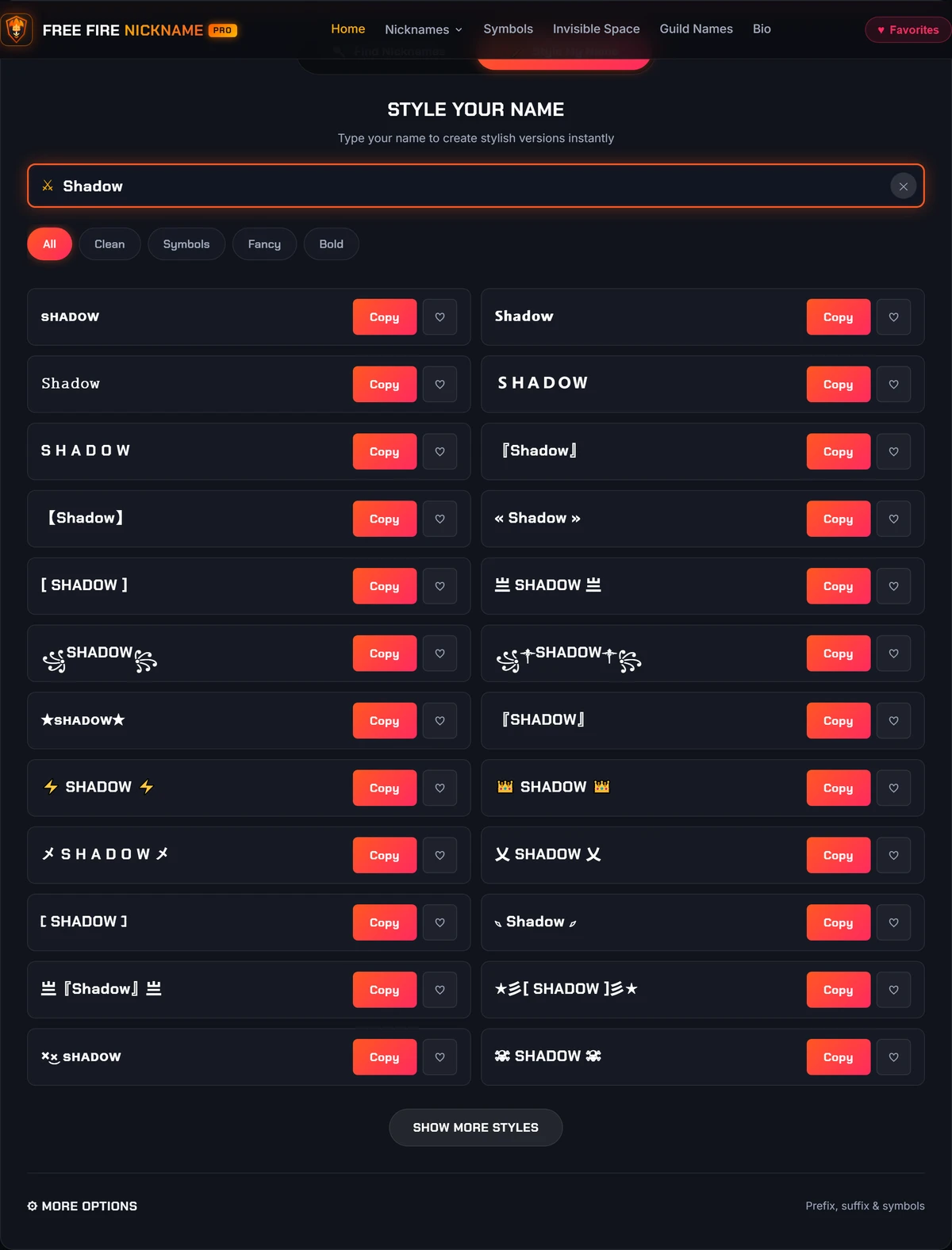
For example, a simple base such as Shadow can become different visual treatments such as:
SHADOWSʜᴀᴅᴏᴡ亗Shadow亗『Shadow』
If you do not have an idea yet, use the name-discovery option first. Choose a result you like, then style that name instead of scrolling through an endless static list.
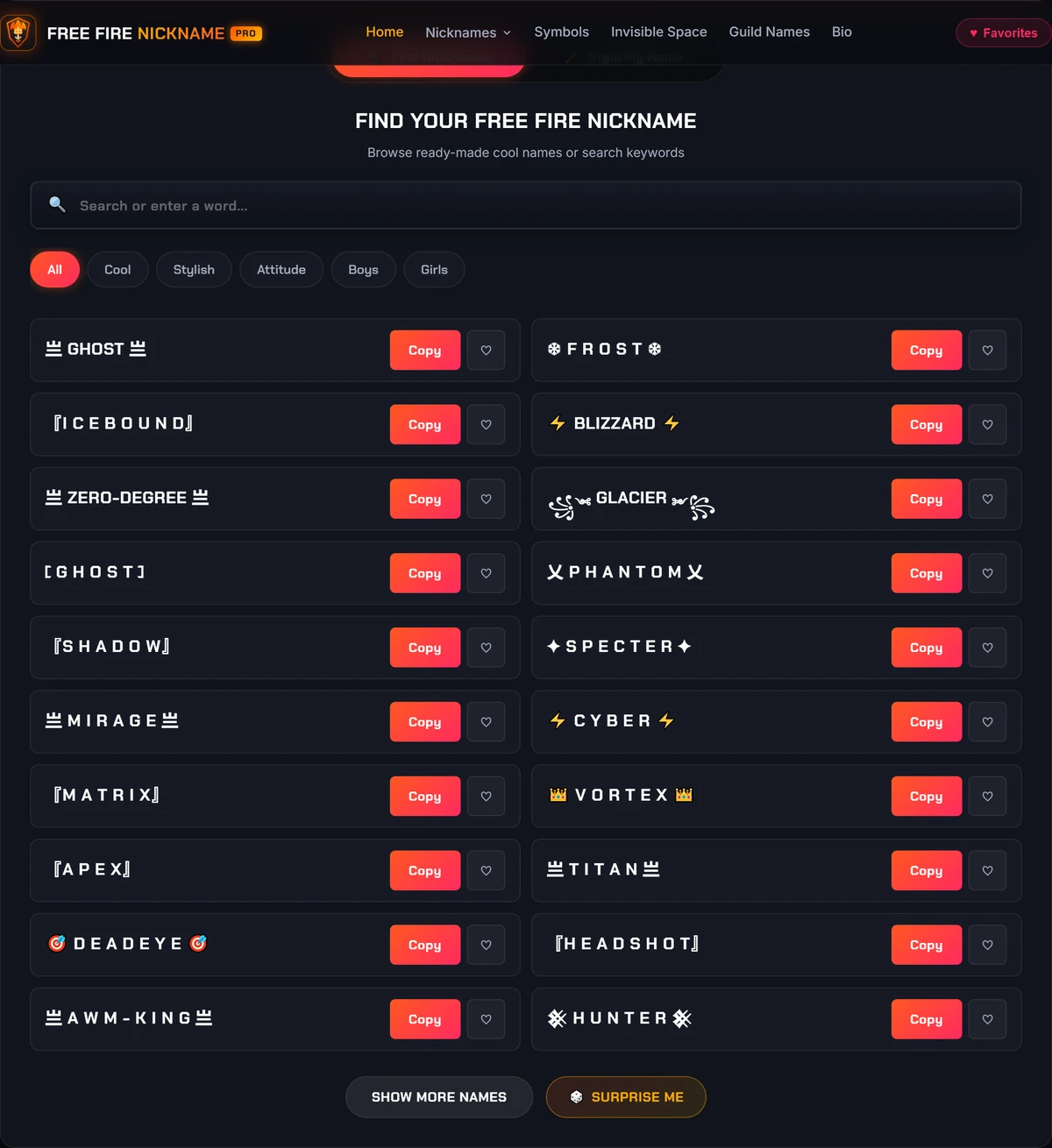
Figure 1: Discovering Base Names — Browse pre-curated gaming categories (Badass, Sweaty, Symbols, Clan) or generate randomized base nicknames directly within the tool.
Choose a Style
A good nickname does not need the maximum amount of decoration. Start with the level that fits what you want:
Clean keeps the name simple and readable.
Pro adds a recognizable gaming-style treatment without overwhelming the base name.
Decorated uses stronger frames, symbols, or styled characters for a more expressive appearance.
Try several versions side by side. The easiest one to notice is not always the easiest one to read.
Figure 2: Real-Time Font Styling & Previews — Typing a gamer tag instantly converts it into dozens of high-contrast Unicode fonts with instant 1-click copy buttons.
Customize Symbols and Decorations
Small symbols can change the look of a nickname without replacing the identity of the name itself.
For example, Shadow can become:
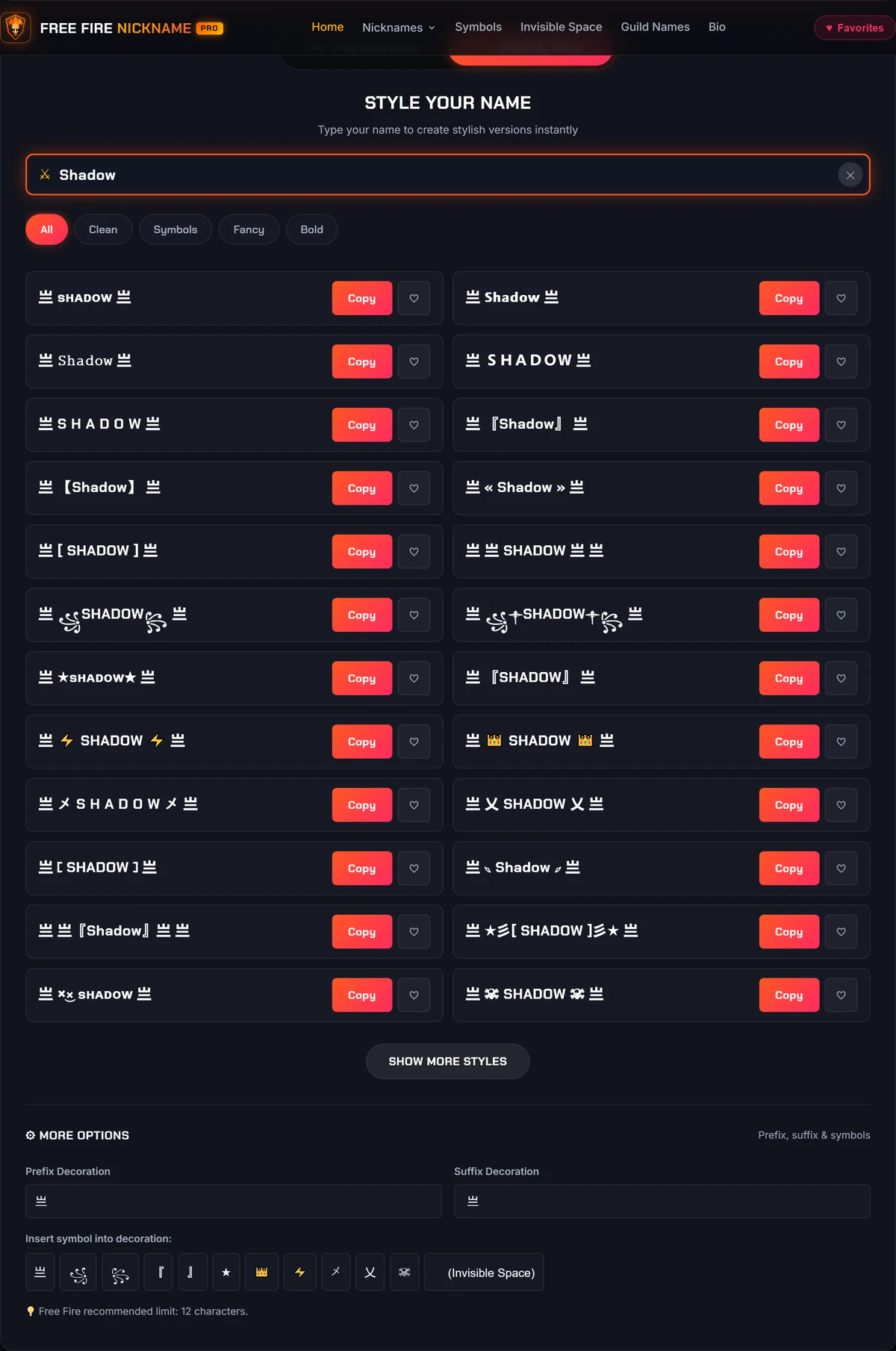
亗Shadow『Shadow』亗Shadow亗
Use the small symbol picker for quick customization. If you want to browse symbols independently rather than generate an entire nickname, use the dedicated Free Fire Symbols collection.
Figure 3: Customizing Emblems & Framing — Expanding the 'More Options' drawer lets you insert custom prefixes (like 亗), suffixes, and quick FF symbols to personalize your gamer tag.
Important: Avoid assuming that every character you can copy from the web will necessarily be accepted or rendered the same way in the game. Unicode contains many different encoded characters, and support can vary by the software and font displaying them.
Preview, Save and Copy
Do not choose only from a single list. Explore multiple variations side by side in Style My Name, switch between Clean, Fancy, and Symbol styles, save promising choices to your Favorites shortlist, and tap Surprise Me when you want fresh inspiration.
When you are ready, tap Copy.
Keep the clean version available as a fallback. If a highly decorated version is rejected or displays incorrectly, you can quickly try the simpler version instead.
What Makes a Good Free Fire Nickname?
A useful gaming nickname needs to do more than look unusual. It should still be recognizable when displayed at a small size and easy enough for you to remember.
There is no single style that works for everyone. A clean one-word name may suit one player, while another may prefer a symbol-framed or heavily styled identity.
Keep the Base Name Easy to Recognize
Start with the identity of the name before decorating it.
Compare Shadow with a version surrounded by several layers of symbols and combining characters. The second version may attract more attention, but extra decoration can make the actual word harder to identify.
Base Name→One Style→Limited Decoration
A practical approach is: base name → one style → limited decoration, rather than adding every available effect at once.
Use Decoration Without Losing Readability
Decorations work best when they support the base name rather than hide it.
For example, 亗NOVA亗 keeps NOVA easy to identify while giving it a stronger visual frame. If you need to stare at your own nickname to work out what it says, simplify it.
The generator's Clean category filter lets you immediately view simpler, unadorned variations of your gamer tag without forcing you to rebuild the nickname.
Keep a Clean Version
Always keep the plain base name available.
Some decorative styles use Unicode characters that look like familiar letters but are actually separate encoded characters. Unicode, for example, includes mathematical alphanumeric characters for styles such as bold, script, Fraktur, and double-struck. That does not mean every app or game field must accept or display every Unicode character in exactly the same way.
A clean fallback gives you another option immediately if your preferred design is rejected or renders poorly.
Free Fire Nickname Styles: Which One Should You Choose?
Different nickname styles work for different gaming identities. A clean name is easy to recognize, while decorative letters and symbols can make a familiar gamer tag look more distinctive.
Nickname style
Example
Best for
Clean
ShadowX
Players who prefer simple names
Bold
𝐒𝐡𝐚𝐝𝐨𝐰
Strong-looking lettering
Small caps
ꜱʜᴀᴅᴏᴡ
Subtle visual styling
Gothic
𝕾𝖍𝖆𝖉𝖔𝖜
Dramatic lettering
Star
★Shadow
Simple decoration
Brackets
꧁Shadow꧂
Framed gaming names
Crown
♛Shadow
Royal-themed nicknames
Competitive
AceX7
Short, recognizable gamer tags
These examples are Unicode text designs, not confirmed available or game-compatible nicknames.
Clean vs. Decorated Free Fire Names
Choose a clean nickname if you want something straightforward and recognizable. Try a decorated version if you prefer a more expressive gaming identity.
You can also save both versions in your favorites and compare them before copying.
A character appearing correctly in your browser does not guarantee that another application will accept or render it. That distinction matters with nickname generators.
A Unicode Character Can Be Valid but Still Be Rejected
Unicode defines characters; an application decides what it accepts in a particular input field. This means a character can:
Copy correctly
Paste correctly elsewhere
Be valid Unicode
...and still be rejected by a game's nickname field.
For that reason, this site should not label an untested style as guaranteed compatible. Use the generator to build and preview your nickname, but verify the final result in Free Fire before committing to a rename.
Why Some Characters Show as Boxes
A square or missing-character symbol usually indicates that the font or software displaying the text does not have a usable glyph for that character.
If a decorated nickname looks correct in your browser but displays poorly elsewhere, try a simpler style. Start by removing:
Unusual emoji
Stacked marks
Complex decorations
Less common styled characters
Then try the clean base name.
What to Try When a Nickname Is Rejected
Do not immediately abandon the name. Simplify it in stages:
Step 1Remove the outermost decorations.
Step 2Remove emoji or unusual symbols.
Step 3Switch from an elaborate letter style to a cleaner one.
Step 4Shorten the base name if necessary.
Step 5Try the plain-text version.
This method helps identify which part of the nickname is causing the problem instead of making you create a completely different identity.
Free Fire Nickname Ideas
Not sure what direction to choose? Start with the type of identity you want rather than browsing thousands of unrelated names:
These collections are for discovery. Once you find a base name you like, bring it back to the main generator to customize the final version.
Explore More Free Fire Name Tools
The main generator is designed for creating and styling your player nickname. More specific tasks have their own tools so you do not have to dig through an oversized generator:
That separation keeps each tool focused on one job.
Frequently Asked Questions
It does both parts of the nickname workflow. You can enter an existing name and explore styled versions, or start with name ideas when you do not yet know what to use. After choosing a base name, you can customize and copy the final result.
Many effects commonly called fancy fonts are made from different Unicode characters rather than a downloadable font applied to ordinary letters. Unicode includes encoded letter-like and mathematical alphanumeric characters with visual forms such as bold, script, Fraktur, and double-struck.
Because they are characters, they can be copied as text. Their appearance and acceptance can still vary between software.
Yes. Select Style My Name, enter your name or gamer tag, and explore the available Unicode letter styles and decorations. You can copy the version you prefer without manually typing special characters.
Yes. Use Find Nicknames to browse ready-made gaming name ideas. You can filter the available categories, copy a name directly, or use it as the starting point for further customization.
Do not assume that every Unicode character or decoration will be accepted. A character can work in your browser and still be rejected or displayed differently in another application.
Try your preferred version in the game's nickname field before confirming a rename, and keep the clean version available as a fallback.
Try the simpler version first. Remove unusual symbols or emoji, reduce decoration, switch to a cleaner character style, and shorten the name if necessary. If the decorated version still fails, use the plain base name and add styling back one element at a time.
A Free Fire nickname works best when the name itself remains recognizable. Start simple, add the style that actually improves it, and keep a clean backup rather than treating more symbols as automatically better.
Use the generator to explore several versions, save the ones you genuinely like, and copy your final choice only after checking how the result looks where you intend to use it.
My Saved Favorites
Your favorites are saved locally on this browser. No login or cloud sync required.