Free Fire Name Rules: Character Limits, Symbols & Restrictions
📅 Updated October 2026⏱️ 7 Min Read🎯 Free Fire & Free Fire MAX⚙️ Technical Unicode Explainer
Found the perfect Free Fire nickname, only to have the game reject it? The problem could be its length, special characters, hidden spaces, or another naming restriction. A name that looks short on your screen can sometimes contain more Unicode characters than you expect.
This guide explains Free Fire name rules, how nickname character counts work, what to know about stylish symbols, and how to troubleshoot an invalid name. You'll also learn how to inspect your nickname before using a Name Change Card or spending Diamonds.
Within Reported Limit: Your nickname contains 10 Unicode code points. Decorative symbols add to code point counts. If Free Fire rejects the name, test plain letters first.
Underlying Unicode Code-Point Breakdown:
Recommended Plain-Text Fallback: Shadow
Free Fire Name Rules at a Glance
Free Fire nicknames must pass the game's current naming checks. Your chosen name needs to meet the applicable length requirements, use text the game can process, and comply with the game's account and conduct policies.
Here's what to review before submitting a nickname.
Rule or consideration
What you should know
Character limit
Many player guides report a 12-character limit, but verify the current restriction in-game
Letters and numbers
Plain text is a useful starting point when troubleshooting
Stylish Unicode letters
They may look different from ordinary letters and can behave differently
Special symbols
Acceptance and display are not guaranteed for every character
Invisible spaces
Hidden Unicode characters may affect validation
Nickname availability
The game determines whether your proposed name is available
Inappropriate names
Avoid abusive, deceptive, or otherwise prohibited naming content
Rename requirements
Review any Diamonds or Name Change Card requirement before confirming
⚠️
Important: A browser-based nickname checker can inspect text, but only Free Fire can confirm whether the name is accepted by your account's current game version.
What Is the Free Fire Name Character Limit?
Many Free Fire nickname guides report a maximum of 12 characters. However, published third-party information does not establish how every current game version counts every type of Unicode character.
That distinction matters because the word character can mean different things in software.
A basic nickname such as Shadow contains six ordinary letters. A decorated version may contain additional symbols, even if it still looks compact.
Do Symbols Count Toward the Character Limit?
Decorative symbols are characters in the text, so they can affect a nickname's length.
For example:
Example nickname
Unicode code points
Explanation
Shadow
6
Six ordinary letters
Shadow7
7
Six letters and one digit
★Shadow
7
One star plus six letters
꧁Shadow꧂
8
Six letters and two decorative symbols
꧁★Shadow★꧂
10
Six letters and four decorative symbols
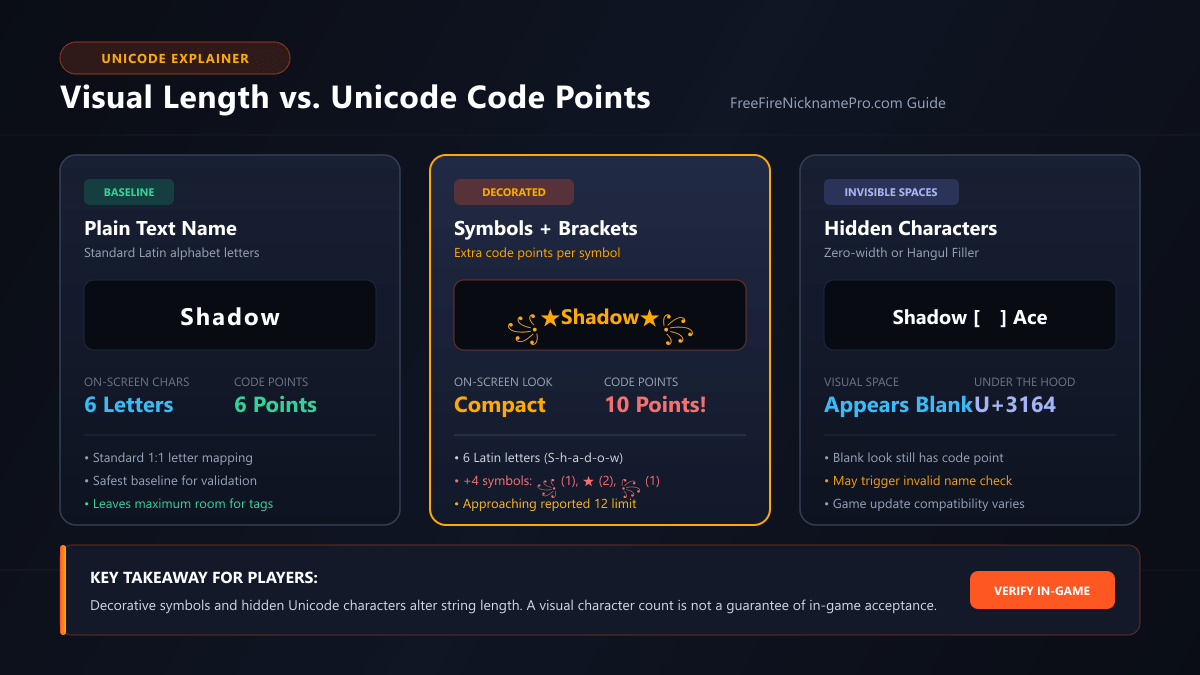
These are Unicode code-point counts, not verified Free Fire character-slot counts.
A game may measure text using a different internal method. Always review its actual response.
Why Styled Names Can Be Longer Than They Look
Unicode includes ordinary letters, decorative symbols, combining marks, and invisible formatting characters.
Some combinations look like a single visible character but contain multiple code points. Others contain hidden characters that you cannot easily spot.
This is why counting only what you see on the screen can be misleading.
Caption: Decorative symbols and hidden Unicode characters can change a nickname's underlying text length. A visual character count is not a guarantee of in-game acceptance.
If your nickname is being rejected, paste it into our Free Fire Name Checker to inspect its Unicode characters and identify possible formatting issues.
🔬 Inspect Hidden Characters Online
Our Free Fire Name Checker reveals hidden code points, zero-width characters, and combining marks with a single click.
Free Fire players commonly use decorative Unicode characters to personalize their nicknames. Popular examples include stars, crowns, brackets, Japanese-style characters, and ornamental marks.
However, a symbol appearing correctly on a website does not prove that Free Fire will accept or display it correctly.
Common Decorative Symbols
The following symbols are examples you can experiment with when preparing a nickname.
Symbol
Description
Example
★
Star
★Shadow
ツ
Katakana character used decoratively
Shadowツ
亗
CJK character used decoratively
亗Shadow
꧁ and ꧂
Decorative brackets
꧁Shadow꧂
♛
Chess queen symbol
♛Shadow
彡
Decorative character
Shadow彡
༒
Tibetan symbol used decoratively
༒Shadow
These are examples, not an officially verified list of accepted symbols.
Use the game's nickname input to check acceptance. If a particular symbol fails, remove it and try a simpler version.
For more characters to explore, visit our Free Fire Symbols collection.
Are Stylish Fonts Allowed?
A stylish nickname generator often produces Unicode text rather than installing an actual font inside Free Fire.
For example:
Standard text: Shadow
Bold-style Unicode: 𝗦𝗵𝗮𝗱𝗼𝘄
Script-style Unicode: 𝓢𝓱𝓪𝓭𝓸𝔀
These versions can look different because they contain different Unicode characters.
Whether the game accepts them, and how they appear on other devices, must be checked separately.
A styled name that displays in your browser might render differently in the game.
Can You Use Emojis in Free Fire Names?
Emoji support should not be assumed.
Some emojis are represented by multiple Unicode code points. Others depend on variation selectors or joiners to create a combined appearance.
This can make their length and rendering behavior more complicated than ordinary text.
If an emoji causes a nickname error, remove it and try a simpler decorative symbol or standard letters instead.
Can You Use Invisible Spaces in Free Fire Names?
Invisible spaces are Unicode characters that create blank-looking areas or affect text formatting.
They are not necessarily the same as pressing the regular spacebar.
Examples include:
Unicode character
Technical name
Why it matters
U+0020
Regular space
Ordinary visible spacing
U+00A0
No-break space
Looks similar to a normal space
U+200B
Zero-width space
Adds a character without visible width
U+200D
Zero-width joiner
Can affect how characters combine
U+3164
Hangul Filler
May appear as blank space
Different invisible characters behave differently. Some may be rejected, ignored, or rendered unexpectedly.
Third-party Free Fire guides also disagree about the compatibility of particular invisible characters across game updates.
For that reason, do not assume any invisible-space character is permanently supported.
Why Can an Invisible Name Fail?
A blank-looking nickname may still contain actual Unicode code points.
The game may reject a name because of unsupported characters, naming requirements, or other validation rules.
If you're trying to add spacing to a nickname, understand the character you're copying rather than pasting random invisible text from an unknown website.
Our Free Fire Invisible Space tool explains the relevant characters and provides copyable examples. In-game compatibility still needs to be checked.
Why Is My Free Fire Name Invalid?
An invalid-name message means the game did not accept your proposed nickname. The exact reason depends on the message and the current validation rules.
Don't immediately assume that the name is too long. Several different issues can produce a failed attempt.
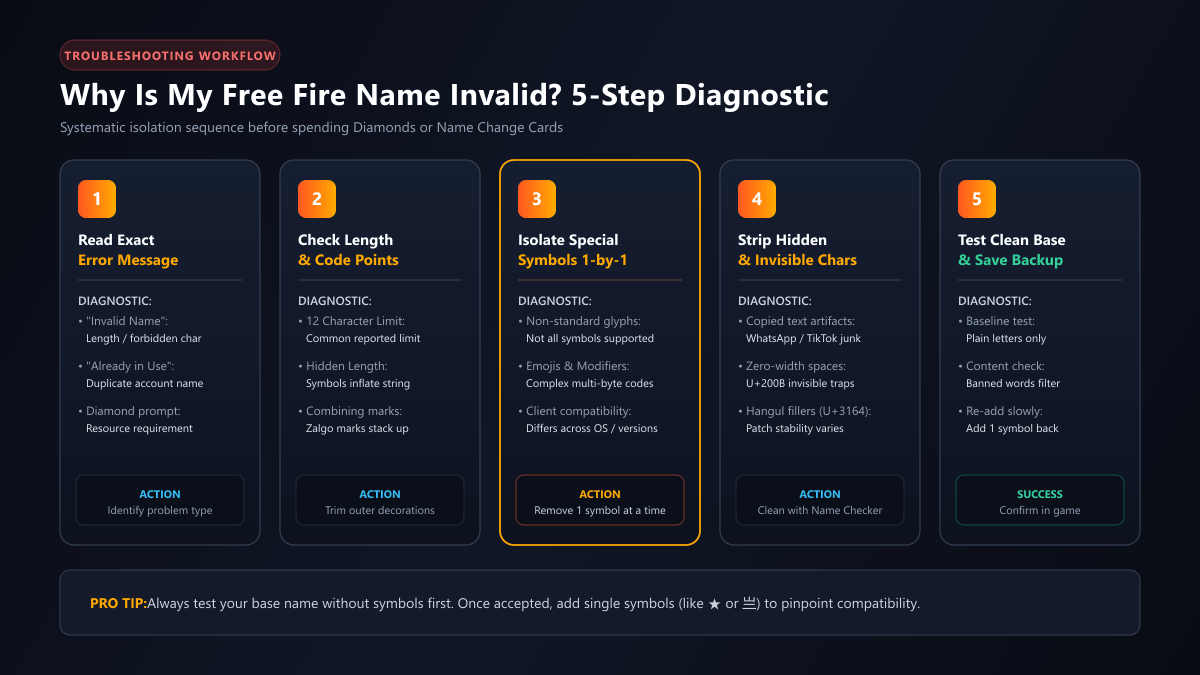
Caption: A practical troubleshooting sequence for rejected Free Fire nicknames. Start with the game's error message, then simplify the text to isolate possible problems.
1. Your Nickname May Be Too Long
A decorated name may include more characters than you realize.
For example, changing ꧁★Shadow★꧂ to Shadow removes the decorative symbols while keeping the main name.
This does not guarantee acceptance, but it helps isolate possible length or formatting issues.
2. A Special Symbol May Not Be Accepted
Some characters may not be supported by the nickname field.
What to do: Remove one unusual symbol at a time. If the simplified version is accepted, the removed character may have contributed to the problem.
Do not treat one successful or unsuccessful attempt as proof that a symbol behaves identically on every account or game version.
3. Your Name May Contain Hidden Characters
Text copied from social media, messaging apps, or generators can contain invisible Unicode characters.
These characters are difficult to identify visually.
What to do: Inspect the text, remove unnecessary invisible characters, and compare the original with a plain-text alternative.
4. The Nickname May Already Be Taken
If the game specifically says that a name is unavailable or already in use, the issue is different from an unsupported-character error.
Try a more distinctive name.
For example:
Shadow
ShadowAce
NovaShadow
ShadowX7
These are naming examples only. Their availability has not been checked.
A text-based name checker cannot confirm live account-name availability without a verified game-side service.
5. The Name May Violate a Content Restriction
Avoid nicknames that impersonate official representatives, target other players with abuse, or contain otherwise prohibited material.
The exact enforcement standards are determined by Garena's current policies and moderation systems.
If your proposed name contains questionable language, choose a neutral alternative.
6. The Problem May Not Be the Nickname
A failed rename can also involve the rename process itself.
Check whether the game displays a requirement for Diamonds, a Name Change Card, or another action.
If the game reports a connection or service problem, troubleshoot that issue separately rather than repeatedly editing the nickname.
How to Check Your Free Fire Name Before Changing It
You can reduce avoidable mistakes by reviewing your nickname before opening the rename confirmation screen.
1
Step 1: Start With a Simple Name
Choose a recognizable base name, such as Nova, Shadow, or Blaze. Shorter names leave more room for optional decorations, although the exact available space depends on the game's current requirements.
2
Step 2: Add Decoration Carefully
Try a simple variation first. For example: Shadow → ★Shadow. Avoid adding several complex symbols before you know whether the basic version works.
These checks help you understand the text. They are not a live Free Fire validation service.
4
Step 4: Save a Backup Nickname
Keep a version containing only ordinary letters and numbers.
Preferred nickname
Simpler alternative
꧁Shadow꧂
Shadow
★Blaze★
Blaze
♛Nova
Nova
亗Rider
Rider
If the decorated version is rejected, you can try the simpler alternative without starting from scratch.
5
Step 5: Check the Name in Free Fire
Open the game's nickname edit interface and enter your proposed name. Read the exact response before confirming. If the game displays a cost or card requirement, review it carefully.
Got quick questions about Free Fire nickname limits and symbols? Here are direct answers based on current Unicode behavior and player guidelines.
Many third-party guides report a 12-character limit. However, the current official counting method for all Unicode characters was not independently verified for this article. Check the game's current nickname field and any displayed error message.
No universal list of supported symbols should be assumed. Different Unicode characters may behave differently, and compatibility can change. Test your chosen name in the game.
A character may not render correctly in the relevant text environment. Try replacing unusual Unicode characters with simpler alternatives and compare the results.
Yes. Invisible Unicode characters can be part of the underlying text even when they don't create an obvious visible symbol. The game determines how those characters affect its validation.
A browser-based Unicode checker cannot independently verify live nickname availability. Use the game's actual nickname interface to check its response.
No. A checker can analyze text, identify hidden characters, and help create a simpler alternative. It cannot guarantee acceptance without a verified connection to the game's validation system.
Final Checklist Before Using Your New Name
Before confirming a nickname change, make sure you have:
📋
Pre-Rename Safety Checklist
0 of 6
Checked the spelling and capitalization
Confirm letter casing and exact arrangement so you don't waste diamonds on a typo.
Reviewed the nickname's length
Ensure the underlying Unicode code points stay within the reported 12-character limit.
Removed unnecessary hidden characters
Strip unwanted zero-width spaces (U+200B) or invisible fillers copied from external apps.
Considered a simpler version if using unusual symbols
Keep a clean alphanumeric fallback (e.g., Shadow) ready if complex ornaments fail.
Checked the actual game's response
Test the name directly in the Free Fire rename field before pressing confirm.
Reviewed any displayed rename requirement
Verify whether you have an active Name Change Card or 390 Diamonds ready on your account.
The safest approach is to prepare your name carefully, understand its Unicode characters, and let Free Fire confirm whether it can be used.
Use the Free Fire Name Checker for text inspection, then return to the game to complete the final check.
Explore Free Fire Nickname & Gaming Identity Tools
Continue customizing your Free Fire identity with our specialized generators, symbol libraries, and player tutorials: