📅 Updated October 2026⏱️ 6 Min Read🎯 Free Fire & Free Fire MAX⚡ Practical Workflow
Want a Free Fire nickname that looks different from ordinary names? You might have seen players using fancy letters, stars, crowns, and decorative brackets, but typing those characters on a regular keyboard isn't always easy. Copying a complicated design can also lead to problems if the game doesn't accept it.
You can make a stylish Free Fire name by choosing a short nickname, converting it into decorative Unicode text, adding symbols, and copying the result. This guide shows you how to do that step by step, with examples you can try and practical fixes if your name doesn't work.
✨
Quick Style Previewer
Live Preview
Mathematical Bold𝐒𝐡𝐚𝐝𝐨𝐰
Mathematical Script𝓢𝓱𝓪𝓭𝓸𝔀
Gothic Fraktur𝕾𝖍𝖆𝖉𝖔𝖜
Small-Cap Styleꜱʜᴀᴅᴏᴡ
Balanced Stars★Shadow★
Tibetan Brackets꧁Shadow꧂
Want to browse 1,000+ fonts, badges, wings, and custom generator presets?
A nickname generator can display alternative Unicode letter styles and decorative combinations. Instead of typing unusual characters manually, you can browse the results and select a design.
For example, the name Shadow can be represented in several ways:
Style
Example
Standard
Shadow
Mathematical bold
𝐒𝐡𝐚𝐝𝐨𝐰
Mathematical script
𝓢𝓱𝓪𝓭𝓸𝔀
Gothic
𝕾𝖍𝖆𝖉𝖔𝖜
Small-cap appearance
ꜱʜᴀᴅᴏᴡ
Decorated
★Shadow★
These examples show different text designs. They have not been verified as accepted nicknames in Free Fire.
Step 3: Choose a Readable Style
Look through the available designs and compare how they appear.
Ask yourself:
Can I recognize the main word immediately?
Is the name easy to read at a small size?
Are the decorative letters too complicated?
Does the name contain unnecessary symbols?
Do I have a simpler alternative?
For a clean appearance, try one letter style before adding decorations.
For a more elaborate look, use a short base name with a symbol on either side.
💡
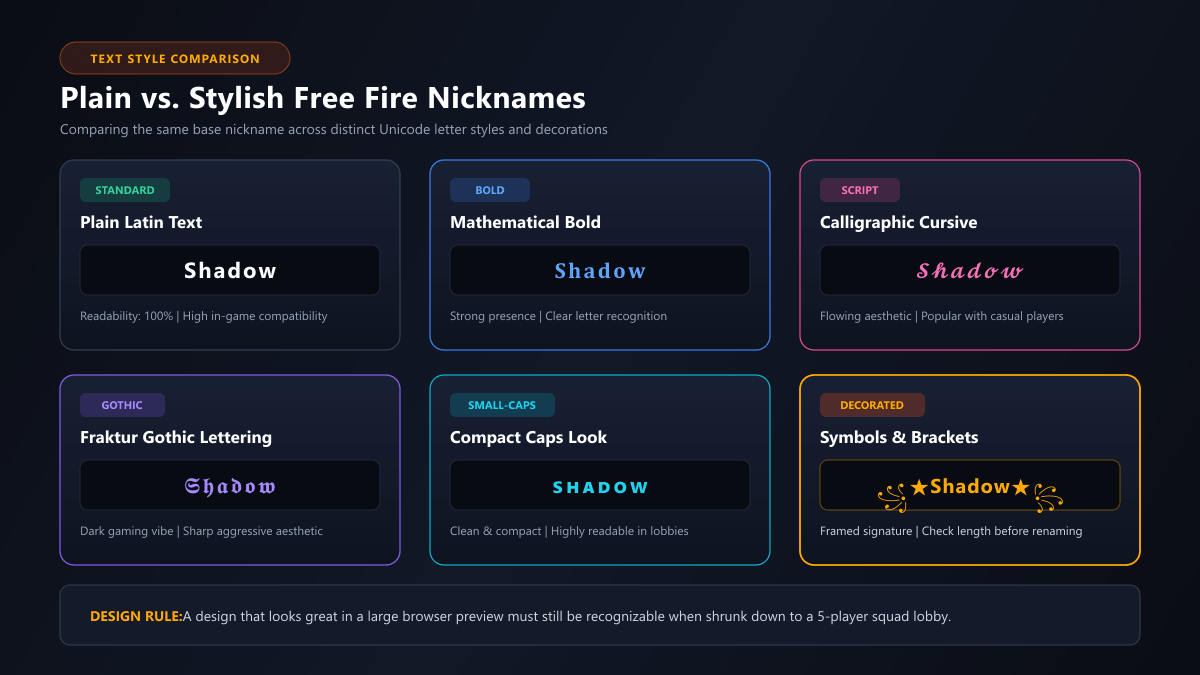
Tip: A design that looks impressive in a large browser preview may be harder to read in a small game interface.
Caption: Comparison of plain and stylish Free Fire nickname text designs. Review readability and letter recognition before confirming in-game.
Step 4: Add Symbols to Customize Your Name
Symbols can give your nickname a different appearance without changing the main word.
Here are some examples:
Decoration
Nickname example
Stars
★Nova★
Crown
♛Nova
Decorative brackets
꧁Nova꧂
Lightning
⚡Nova
Japanese-style character
亗Nova
Ornamental brackets
『Nova』
You can browse additional characters in the Free Fire Symbols collection.
Don't assume that every symbol is supported by the game. Garena's own nickname guidance warns that special characters may not display correctly on every device.
Step 5: Copy Your Stylish Nickname
Once you've chosen a design, use the generator's Copy button.
Copying preserves the Unicode characters in the selected text. However, copying a nickname successfully does not mean that Free Fire will accept it.
Before opening the game, consider saving both versions:
Stylish name: ꧁Nova꧂
Simple backup: Nova
If the decorated name is rejected, the plain version gives you an alternative.
Step 6: Paste the Name Into Free Fire
After copying your nickname:
Open Free Fire.
Go to your player profile.
Find the nickname edit option.
Open the name-change interface.
Paste your prepared nickname.
Review the name and any displayed rename requirement.
Confirm only when you're satisfied.
The exact controls can differ by game version.
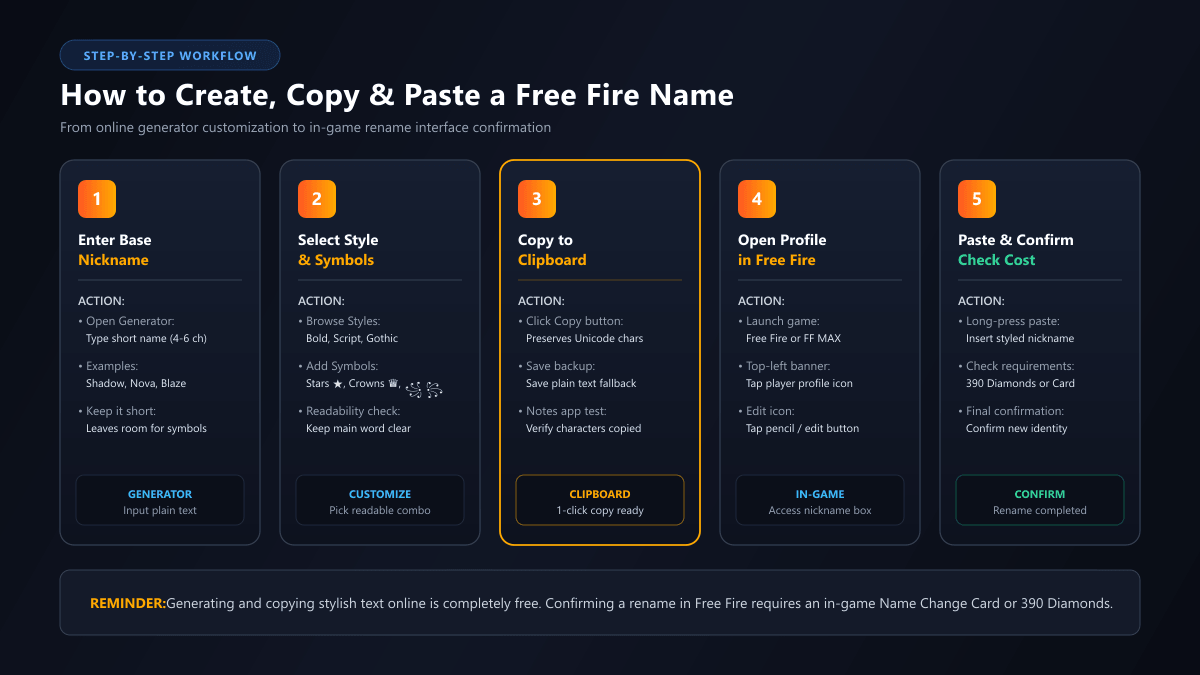
Changing your in-game nickname may require Diamonds or a Name Change Card. Creating and copying text on a generator is separate from paying for a rename inside the game.
Caption: Step-by-step visual showing how to create and paste a stylish Free Fire name into the player profile rename field.
What Makes a Free Fire Name Stylish?
A stylish Free Fire nickname is ordinary text that has been customized using decorative Unicode characters.
The main idea is to change how the name looks while keeping it recognizable.
There are three common ways to do this.
1. Change the Letter Style
You can replace ordinary Latin letters with visually different Unicode characters.
For example:
Blaze
𝐁𝐥𝐚𝐳𝐞
𝓑𝓵𝓪𝔃𝓮
𝕭𝖑𝖆𝖟𝖊
These are not different font settings installed in Free Fire. They are different sequences of text characters. That is why a generator can copy them as text.
2. Add Decorative Symbols
You can keep the original letters and place symbols around them.
For example:
★Blaze★
♛Blaze
『Blaze』
꧁Blaze꧂
This approach keeps the main word familiar while changing its appearance.
3. Combine Letters and Symbols
You can also combine a Unicode letter style with a decorative symbol.
For example:
★𝐁𝐥𝐚𝐳𝐞
♛𝓑𝓵𝓪𝔃𝓮
『𝕭𝖑𝖆𝖟𝖊』
The more characters you add, the more important it becomes to check the nickname's length and readability. A heavily decorated name may not be practical for every player.
Stylish Free Fire Name Examples You Can Customize
Use these examples as starting points for your own nickname.
Name style
Example
Design idea
Clean
NovaAce
Simple and recognizable
Bold
𝐍𝐨𝐯𝐚
Strong-looking letters
Script
𝓝𝓸𝓿𝓪
Curved decorative lettering
Crown
♛Nova
One leading symbol
Star
★Nova★
Balanced decoration
Brackets
꧁Nova꧂
Framed nickname
Gothic
𝕹𝖔𝛂𝖆
Angular lettering
Short competitive
AceX
Compact identity
Lightning
⚡Ace
Minimal decoration
Small-cap style
ɴᴏᴠᴀ
Subtle visual variation
These are illustrative examples, not an availability list or compatibility test.
How to Make a Stylish Free Fire Name Without Installing an App
You can create Unicode-style nicknames directly in a browser.
Here's how:
Open an online nickname generator.
Type your preferred name.
Browse the available text styles.
Choose a design.
Copy the generated text.
Paste it into the game's nickname field.
You do not need to install a special keyboard or modify the game simply to prepare Unicode text. However, the game still controls which characters it accepts.
🔒
Account Safety Note: Avoid websites that ask for your Free Fire password, account login, or verification codes just to generate a nickname. Those details are not necessary for creating decorative text.
How to Make a Stylish Free Fire Name on Android or iPhone
The basic creation process is similar on Android and iPhone.
Open the nickname generator in your mobile browser, enter your base name, and copy the design you prefer. Then switch to Free Fire and paste the text into the nickname editing field.
If the Copy Button Doesn't Work
Try these steps:
Tap Copy again.
Check whether the browser has copied the text.
Paste it into a notes app to inspect the result.
Return to the generator if the text is incomplete.
Try another browser if the problem continues.
If you can paste the name into a notes app but not into the game, the issue may involve the game's input or validation behavior rather than the generator.
If the Name Looks Different on Another Phone
Unicode rendering depends on the fonts and text support available in the viewing environment.
A character that looks attractive in one browser may appear differently elsewhere.
If readability matters, choose a simpler letter style and avoid unusually complex symbols.
How Many Characters Can a Stylish Free Fire Name Have?
A stylish nickname still needs to satisfy the game's current naming requirements.
Some third-party guides report a 12-character nickname limit, but their information is not consistent about Unicode counting or game-version differences.
Therefore, do not assume that a browser's character counter exactly matches Free Fire's validation method.
Consider these examples:
Nickname
Unicode code points
Nova
4
★Nova
5
★Nova★
6
꧁Nova꧂
6
𝐍𝐨𝐯𝐚
4
꧁𝐍𝐨𝐯𝐚꧂
6
A code point is a technical unit of Unicode text. Some visible characters consist of more than one code point, while some decorative letters use multiple UTF-16 code units.
These distinctions help explain why different text counters may show different values.
For a closer look at your nickname, use our Free Fire Name Checker. It can help inspect the text, but the game must make the final acceptance decision. You can also read our full guide on Free Fire Name Rules.
Why Isn't My Stylish Free Fire Name Working?
If the game rejects your chosen nickname, don't immediately abandon the entire design.
Try to identify which part of the text may be causing the problem.
The Name Contains Too Many Characters
A short word can become much longer after adding decorative brackets, stars, and other symbols.
Try this: Remove the decorations and submit a shorter version.
For example:
Original: ꧁★Shadow★꧂
Simpler: ★Shadow
Plain backup: Shadow
These examples show how to reduce complexity, not guaranteed accepted names.
Some Symbols May Not Be Supported
Garena warns that special characters may not display correctly across devices.
If the nickname contains unusual symbols, remove them one at a time.
Start with ordinary letters, then test a simpler decorative version if appropriate.
The Name Contains Invisible Characters
Some copied text includes hidden Unicode characters, such as zero-width spaces or other formatting marks.
These characters can be difficult to identify by looking at the nickname.
Use the Free Fire Name Checker to inspect the underlying text. If invisible characters are unnecessary, remove them and compare the result.
The Name Is Already in Use
If Free Fire specifically reports that your nickname is unavailable, try changing the base word rather than only adding symbols.
For example:
Nova
NovaAce
NovaX7
NovaRider
Only the game can confirm which names are currently available.
The Game Displays a Different Error
Read the exact message.
An insufficient-resource warning, connection issue, or rename restriction should not automatically be treated as a problem with Unicode symbols.
If necessary, consult the game's official support resources.
How to Make Your Stylish Name Easier to Read
A good-looking nickname should still communicate your identity.
Here are practical design principles.
Keep the Main Name Recognizable: If your base name is Shadow, make sure the final version still looks like that word. Using too many decorative characters can make the name harder to identify.
Use One Main Decoration: Start with a single star, crown, or bracket pair. For example, ★Shadow is visually simpler than a name containing several layers of symbols.
Avoid Too Many Lookalike Letters: Some Unicode characters resemble ordinary English letters but belong to different writing systems. That can make the text confusing when someone tries to type your name manually.
Preview the Name at a Small Size: A large generator preview isn't the same as the compact text displayed in a game interface. Check whether the main word remains readable when the text is smaller.
Save Your Original Name: Keep a plain-text copy before making changes. That way, you can return to a recognizable version without rebuilding the nickname.
Should You Use Fancy Letters or Symbols?
Both approaches can work visually, but they solve different design needs.
Feature
Fancy Unicode letters
Decorative symbols
Changes the main word's appearance
Yes
Usually no
Keeps ordinary letters intact
Not always
Often
Can add text complexity
Yes
Yes
Easy to remove individually
Depends on style
Usually
Guaranteed in-game compatibility
No
No
If you want the name itself to look different, explore Unicode letter styles.
If you prefer your usual nickname but want a distinctive appearance, try a small symbol or bracket.
You can also combine both approaches, provided the result remains readable and the game accepts it.
Frequently Asked Questions
Common questions from players creating stylish Free Fire names.
You can create and copy a decorative Unicode nickname using a browser-based generator without paying for the text itself. Changing your actual nickname inside Free Fire may require an in-game resource.
Yes. A browser-based generator can create copyable Unicode text without requiring a separate mobile app.
You can prepare nicknames using Unicode characters that resemble different font styles. However, the game's current input validation and rendering determine whether a particular version works.
Select your preferred generated nickname, tap Copy, and paste it into the nickname field inside Free Fire. Review the result before confirming a rename.
The text environment may not support rendering certain Unicode characters. Try a simpler style or ordinary letters.
Additional changes may be possible, subject to the game's current rename requirements. Check the available options and costs in your account.
Create Your Stylish Free Fire Name
Start with a short nickname, explore a few Unicode styles, and add decoration only when it improves the appearance.
Copy your favorite design, keep a plain-text alternative, and check the result in Free Fire before confirming a rename. If you want more variations, return to our Free Fire Nickname Generator and create another style.
🔥 Ready to Design Your Signature Nickname?
Open our full Nickname Generator to browse over 1,000 custom fonts, fancy symbols, brackets, and battle-ready identities.