📅 Updated October 2026⏱️ 6 Min Read🎯 Free Fire & Free Fire MAX⚙️ Ghost Name Explainer
Want a blank-looking or invisible Free Fire nickname that makes you stand out in the kill feed and match lobby? You might have seen players running around with no visible name above their character, but pressing the spacebar inside Free Fire only triggers an "Empty Name" or "Invalid Character" error.
You can make an invisible Free Fire name by copying specific Unicode filler characters (such as U+3164 Hangul Filler) that render as blank space while being recognized as valid text by the game engine. This guide shows you how to do that step by step, with copy-paste instructions, code point breakdowns, and fixes if the game rejects your blank name.
👻 Need an Invisible Character?
Open our dedicated invisible-space tool to inspect different Unicode characters, test gap widths, and copy characters directly to your clipboard.
*Copying a character does not guarantee that Free Fire will accept it as a nickname. In-game validation is always required.
An invisible Free Fire nickname (also known as a blank name or ghost tag) is an account nickname that appears completely empty in the game lobby, friend list, loading screen, and kill notifications.
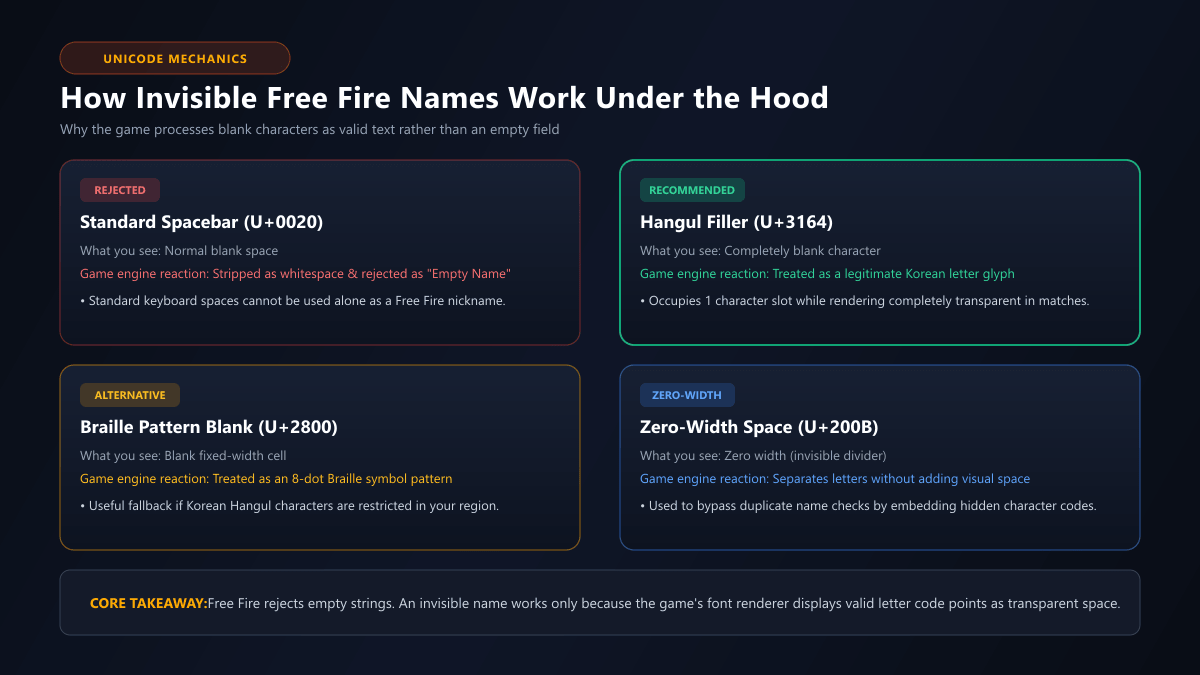
To a casual observer, it looks like the player has bypassed the game's naming requirements. However, Free Fire never allows a truly empty string. If you try to submit a name containing only standard spacebar presses (Unicode U+0020), the game engine automatically strips the whitespace and displays an error message.
An invisible nickname works because it uses special Unicode characters known as fillers or blank glyphs. The most popular example is the Hangul Filler (U+3164), originally created for the Korean writing system. To computer software and game databases, this character is a legitimate letter code point. But when the game's graphical font engine renders it on your screen, it draws no pixels, leaving a transparent gap.
Caption: How invisible Free Fire names work under the hood. Standard spaces are stripped as empty input, while Hangul Fillers (U+3164) are processed as valid character code points that render transparently.
How to Make an Invisible Free Fire Name
Creating an invisible nickname is straightforward when you use copy-paste tools. Follow this step-by-step sequence to prepare your character code before opening the game.
1
Step 1: Obtain the Correct Invisible Character
You cannot type an invisible filler character on standard Android or iOS keyboards. Use our Free Fire Invisible Space tool or the quick copy chips above to copy the Hangul Filler (U+3164) code.
2
Step 2: Copy a Multi-Character Combination
Because millions of players have tried invisible names over the years, a single isolated U+3164 character is almost certainly already claimed on your regional server. To avoid the dreaded "Nickname already exists" error, copy a combination of two, three, or four invisible characters (or stack Hangul Fillers with Zero-Width Spaces).
3
Step 3: Test the Copied Text in a Notes App or Name Checker
Before opening Free Fire, paste your clipboard text into a notepad application or our Free Fire Name Checker. Ensure that your cursor advances by a few spaces and that no strange question mark boxes or broken symbols appear.
4
Step 4: Open Your Free Fire Player Profile
Launch Free Fire or Free Fire MAX. Tap your player avatar/banner in the top-left corner of the main lobby screen, then tap the yellow notepad/pencil icon next to your current nickname to open the rename popup dialog.
5
Step 5: Paste and Confirm Your Rename
Long-press inside the "New Nickname" field and select Paste. Review the rename cost: you will need either 390 Diamonds or 1 Name Change Card (available in the Guild store for 39 Diamonds + 200 Guild Tokens). Tap confirm to apply your ghost identity.
💎
Diamond Reminder: Creating and copying invisible characters online is completely free. However, changing an existing nickname inside Free Fire requires in-game resources. For detailed rename steps, see How to Change Your Free Fire Name.
How to Copy Invisible Characters
Because invisible characters have no visible glyph, selecting them manually with a mouse cursor or touch drag can be tricky.
Here are the most reliable methods depending on your device:
On Android & iPhone (Mobile)
Mobile browsers often collapse blank spaces if you attempt to highlight them manually. The easiest solution is to use our 1-Click Copy Tool:
Tap the "Copy Invisible Space" button. The browser utilizes the Clipboard API to copy the exact Unicode sequence directly to your device memory.
Switch to your mobile notepad app and paste once to verify that the cursor moves forward.
On PC Emulators (BlueStacks, LDPlayer, MSI App Player)
If you play Free Fire on a PC emulator:
Copy the character code from your desktop browser.
Ensure shared clipboard is enabled in your emulator settings (usually enabled by default).
Alternatively, open Chrome inside the emulator instance, visit the tool, and copy directly within the Android environment.
Use Ctrl + V or long-click to paste into the Free Fire nickname field.
Why Isn't My Invisible Name Working?
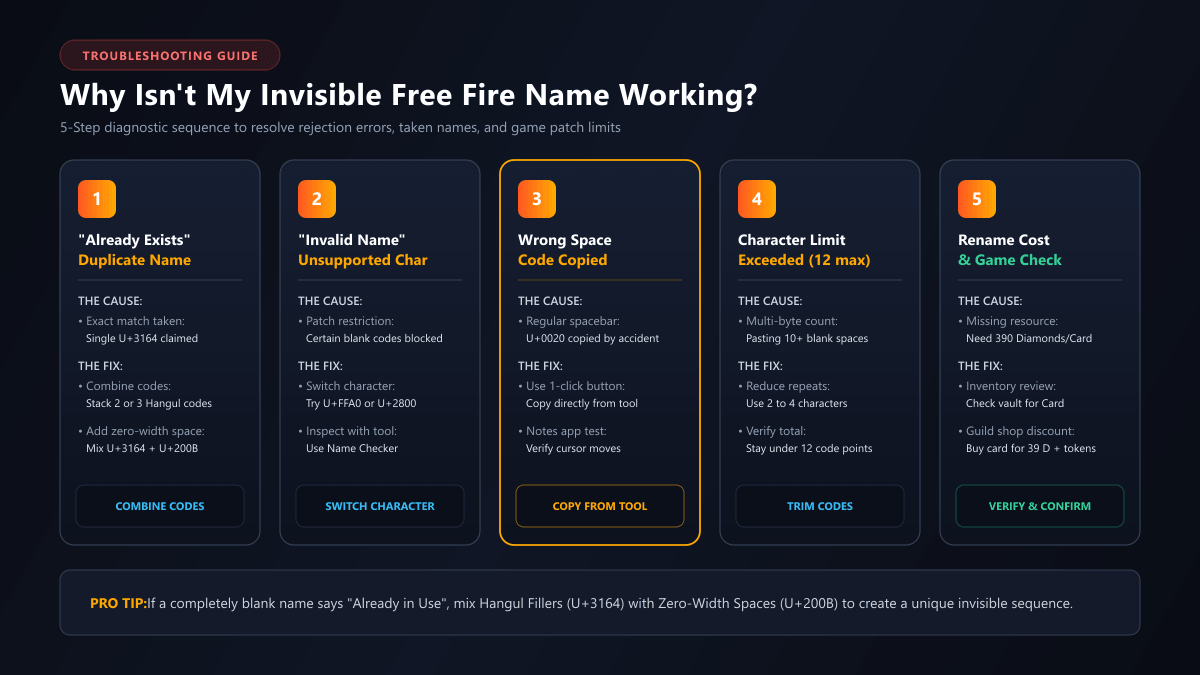
If Free Fire rejects your invisible nickname attempt, don't worry. The issue is almost always caused by one of five common factors.
Caption: Diagnostic sequence for rejected invisible nicknames. Isolate whether the failure is caused by duplicate registrations, unsupported character codes, or whitespace stripping.
1. "Nickname Already Exists" (Duplicate Name)
This is the most common reason for failure. Because every Free Fire nickname must be globally unique within your server region, a single blank character (such as one U+3164) was claimed years ago by early players.
How to fix it: Combine multiple invisible characters into a unique sequence. For example, combine two Hangul Fillers, or interleave a Hangul Filler with a Zero-Width Space (U+200B). Each unique combination counts as a different string in Garena's database.
2. "Invalid Name" or "Name Cannot Be Empty"
If the game warns that your nickname is empty or contains invalid characters, you likely copied a regular spacebar (U+0020) or an unsupported control character instead of a valid Hangul letter glyph.
How to fix it: Do not use your keyboard spacebar. Return to our Invisible Space tool and copy the verified U+3164 or U+FFA0 character.
3. Character Limit Exceeded (Over 12 Characters)
As detailed in our Free Fire Name Rules guide, Free Fire nicknames have a commonly reported 12-character limit. Because invisible filler characters are multi-byte code points, pasting 15 or 20 of them will exceed the allowed buffer.
How to fix it: Keep your total count between 2 and 5 invisible characters. Inspect the exact count using the Free Fire Name Checker before submitting.
4. Recent Game Patch or Regional Restrictions
Garena periodically updates its character sanitization filters. Certain regional game clients (such as Latin America, Europe, or South Asia) may occasionally restrict non-Latin script ranges like Korean Hangul if they detect abuse.
How to fix it: If U+3164 is rejected by your client, test the Braille Pattern Blank (U+2800) or No-Break Space (U+00A0) as alternative transparent codes.
5. Insufficient Diamonds or Missing Name Change Card
Sometimes the error has nothing to do with the text. If you don't have 390 Diamonds or a Name Change Card stored in your vault, the game will refuse to confirm the rename dialog. Verify your inventory before troubleshooting the characters.
Invisible Name vs. Invisible Space: What's the Difference?
Players often confuse having an entirely invisible nickname with using an invisible space. While both rely on similar Unicode characters, their gameplay purpose and implementation are very different:
Feature
Invisible Nickname
Invisible Space
Visual Appearance
Completely blank / empty player tag
Visible words separated by a clean gap
Example
[ㅤㅤㅤ] (Nothing visible)
ShadowㅤAce or SKㅤSABIR
Purpose
Ghost identity, mystery, kill-feed trick
Clean clan tags, multi-word gamer handles
Duplicate Name Risk
High (Millions seek pure blanks)
Low (Base words provide uniqueness)
Patch Stability
Medium (Subject to blank filters)
High (Standard practice across esports)
If an entirely invisible nickname is continuously rejected on your account, using an invisible space between two stylish words (like ★ㅤSHADOW) is the most reliable way to achieve a sleek, premium look.
Does an Invisible Name Work in Free Fire MAX?
Yes. Free Fire and Free Fire MAX share the same unified backend account architecture (Firelink). Your player UID, inventory, guild membership, and display nickname are identical regardless of which client you log into.
However, there are a few version-specific details to keep in mind:
Cross-Client Rendering: If you set an invisible name in Free Fire standard, it will also appear blank to players using Free Fire MAX in the same match lobby.
High-Resolution Interface: Free Fire MAX features enhanced 3D lobby graphics. In some post-match scoreboards, a completely blank name may render a slightly wider placeholder space compared to the original client.
Rename Process: The rename dialog, Diamond cost, and Name Change Card requirements are identical on both clients.
Before spending 390 Diamonds or using an expensive Name Change Card, check off these verification steps:
📋
Invisible Name Verification Checklist
0 of 5
Copied a verified Unicode filler code
Used Hangul Filler (U+3164) rather than standard spacebar presses.
Created a unique multi-character combination
Combined 2 to 4 invisible characters to avoid the duplicate name error.
Tested cursor movement in a notes app
Confirmed that the copied characters paste properly without displaying error boxes.
Saved a backup nickname alternative
Have a stylish fallback name ready (e.g. from our Nickname Generator) in case blank text is restricted.
Verified Diamond or Name Change Card balance
Checked player vault to confirm resources before clicking final confirmation.
Frequently Asked Questions
Got more questions about invisible Free Fire nicknames? Here are direct answers to common player inquiries:
The standard space character (U+0020) is treated as whitespace by game servers and is automatically stripped. Free Fire requires at least one recognized Unicode character code, which is why special glyphs like Hangul Filler (U+3164) are used instead.
Copying the invisible Unicode character is completely free. However, changing an existing nickname inside Free Fire costs 390 Diamonds or 1 Name Change Card unless you are setting up a brand new account for the first time.
Because a single invisible character like U+3164 has already been registered by another player. You need to combine multiple invisible characters (such as 2 or 3 Hangul Fillers or a mix with Zero-Width Spaces) to create a unique invisible sequence.
Yes, because Free Fire and Free Fire MAX share the same player database and account profile system. However, text rendering engines may differ slightly between client versions, so testing in the rename box before confirming is always advised.
Invisible names use legitimate international Unicode characters rather than game hacks or third-party script injectors. While not bannable as a cheat, Garena may occasionally patch unsupported characters during game updates or release reserved names.
An invisible name consists entirely of blank characters so your player tag appears empty. An invisible space is used as a separator between visible words (for example, ShadowㅤAce) to add spacing where standard spacebars are disallowed.
Explore Free Fire Nickname & Gaming Identity Tools
Continue customizing your Free Fire identity with our specialized generators, symbol libraries, and player tutorials: