📅 Updated October 2026⏱️ 5 Min Read🎯 Free Fire & Free Fire MAX🎮 In-Game Guide
Want to replace your old Free Fire nickname but aren't sure where the rename option is? The process is usually straightforward, but the available payment options, nickname restrictions, and confirmation steps can make it confusing.
You can change your Free Fire name through your player profile using the rename option. Depending on your account and current game version, you may need Diamonds or an available Name Change Card. Follow the steps below, check your new nickname carefully, and confirm the cost shown in your game before proceeding.
📋
Rename Preparation Checklist
0 of 4
I've selected my new nickname
Choose a battle name you will be proud to keep across matches and guild lobbies.
Have a clean plain-text version ready if Free Fire's client rejects special brackets or symbols.
I've checked the in-game rename cost or card option
Confirm the exact Diamond price or Name Change Card requirement displayed in your account.
How to Change Your Free Fire Name Step by Step
You don't need to create a new account just to choose a different nickname. Follow these eight sequential steps inside your game client:
1
Open Free Fire
Launch Free Fire or Free Fire MAX on your device and wait for the main lobby to finish loading.
2
Open Your Profile
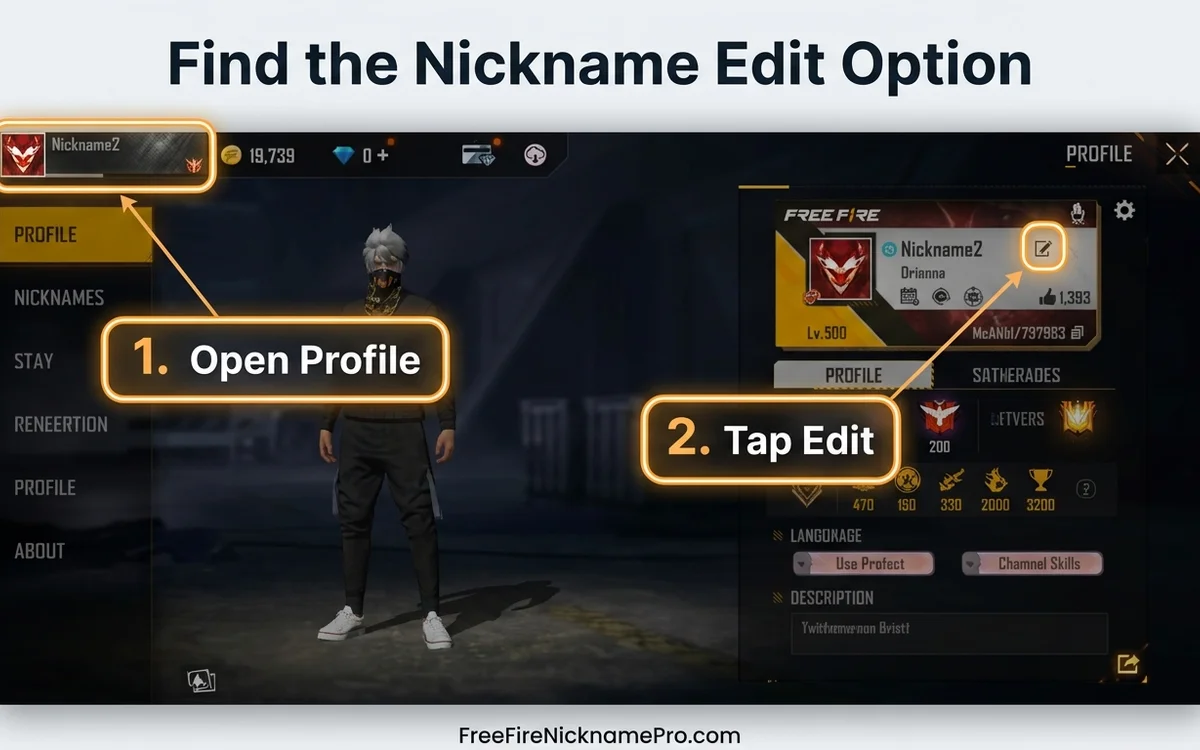
Tap your player avatar or profile banner area, usually located in the upper-left corner of the lobby screen.
Figure 1: Access your player profile in the top-left corner and tap the pencil edit icon next to your nickname.
3
Find the Nickname Edit Option
Look for an edit icon, pencil symbol, or name-change control directly beside your current nickname. The exact visual layout can vary slightly by game version.
4
Enter Your New Nickname
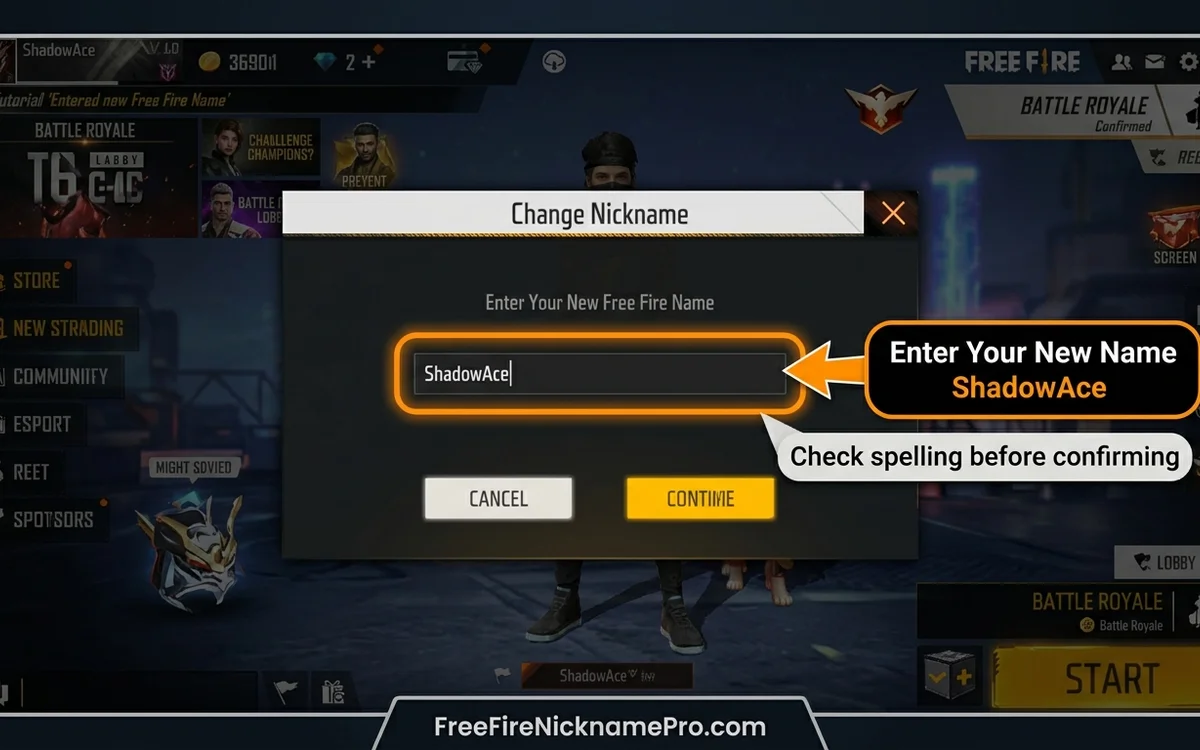
Tap into the text field, delete the previous text, and type or paste your preferred battle name.
Figure 2: Type or paste your new nickname into the input box and verify spelling before continuing.
5
Review the Name
Carefully inspect spelling, decorative symbols, spacing, and capitalization in the input preview.
6
Check the Payment Option
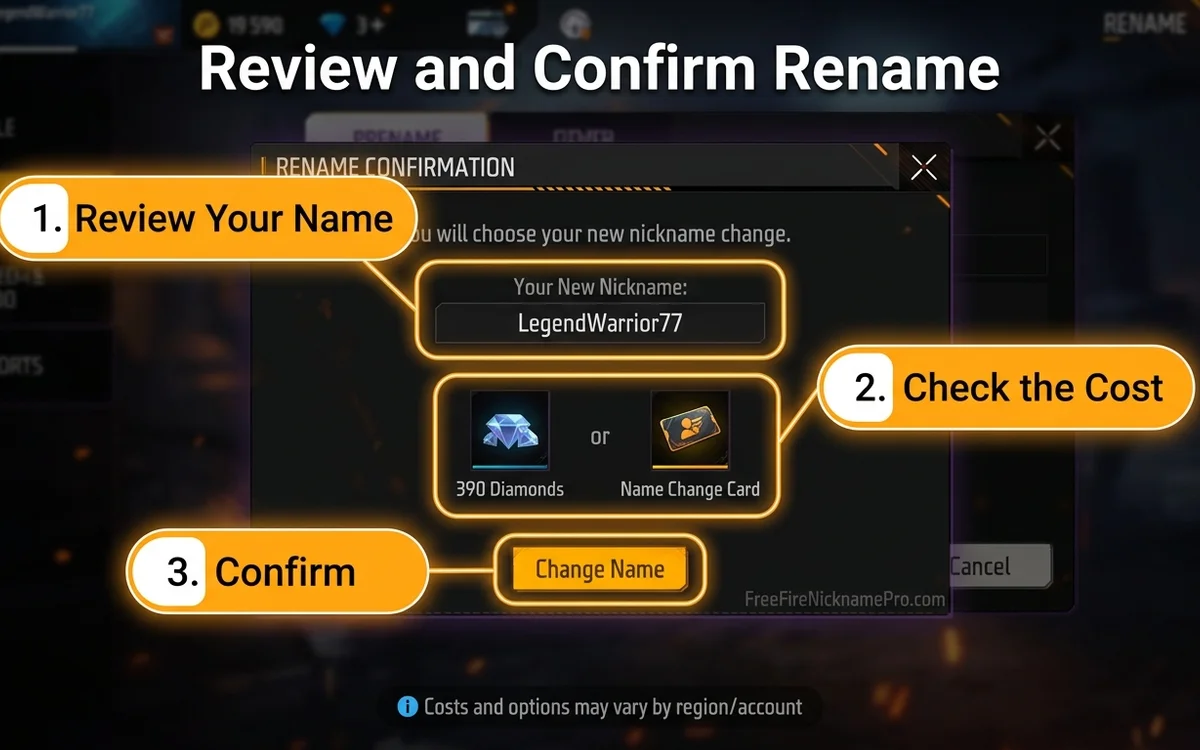
The game will display the applicable Diamonds requirement or an available Name Change Card option on the confirmation prompt.
Figure 3: Review the nickname preview and check the required Diamonds or Name Change Card option before confirming.
7
Confirm the Change
Proceed only when you are completely satisfied with the nickname and the displayed cost.
8
Check Your Profile
Return to your profile card and verify that the new name appears correctly across your character stats and lobby badge.
Interface Advice: If the controls look different on your device, follow the labels displayed in your current game client rather than relying on an older screenshot.
How Much Does It Cost to Change Your Free Fire Name?
Free Fire nickname changes may involve Diamonds or a Name Change Card.
Published third-party guides disagree about the exact Diamond costs. Some distinguish between direct renaming and purchasing a Name Change Card, while others describe different prices or promotions (e.g. 390 Diamonds versus 800 Diamonds).
Because pricing and availability may vary depending on region, platform, and active server events, check the current cost inside Free Fire before confirming your rename.
Method
What to Check
Direct nickname change
Diamond cost displayed on the in-game confirmation screen
Name Change Card
Whether you own an active card and can select it on the modal
Special promotion or event
Whether a current official event offers a rename card reward
Diamond Safety Tip: Don't spend Diamonds based only on a price quoted by an older guide. Your game's live confirmation dialog is the sole authoritative price for your account.
How to Use a Free Fire Name Change Card
A Name Change Card is an in-game item associated with changing your nickname without spending direct Diamonds at the moment of rename.
If your account has one available:
1.Open your player profile from the main lobby.
2.Select the nickname edit option beside your current name.
3.Enter your new name in the text box.
4.Check whether the confirmation screen offers the Name Change Card button.
5.Select the card option if available.
6.Review the name and confirm the rename.
The exact card availability and interface may differ across game versions or regional servers.
Where Can You Get a Name Change Card?
Third-party guides mention in-game stores, guild redeem sections (using Guild Tokens + minor Diamonds), seasonal battle passes, and event reward systems as possible sources.
However, these opportunities may change over time. Check the current in-game Store, Events tab, and Guild Exchange for any available card.
Security Warning: Avoid websites or third-party apps promising "unlimited free Name Change Cards" in exchange for your account password or login information. Official cards only exist within the Free Fire game client.
🔍 Free Fire Name Checker & Unicode Inspector
Before spending Diamonds or a Name Change Card, check your name's character count, spot hidden spaces, and detect unsupported combining marks.
Changing a nickname can involve spending an in-game resource, so prepare the text before opening the rename screen.
Choose a Name You Actually Want to Keep
A nickname should be recognizable and easy to share with friends, teammates, and clan recruitment leaders. If you're struggling to decide, explore our Free Fire nickname generator or browse curated Free Fire name ideas before committing.
Check the Spelling
Look for accidental spaces, repeated letters, and missing characters. A stylish name can be difficult to proofread when decorative characters resemble ordinary letters.
Review Special Symbols
Some Unicode symbols look attractive in a browser but may display differently in a game. If you're using decorative brackets, crowns, or unusual letters from our Free Fire symbols library, keep a simpler version ready in case the original isn't accepted.
Save a Plain-Text Alternative
Having a fallback option saves frustration if your first choice is blocked:
Decorative Option:꧁Shadow꧂
Simple fallback alternative:
Simple Alternative:Shadow
These are text examples, not claims that either name is currently available or accepted by Free Fire.
Review the Final Confirmation
Before completing the change, check the exact nickname and any displayed Diamond or card requirement. Do not assume you can reverse the rename without another in-game action.
Why Can't I Change My Free Fire Name?
If the game refuses your new nickname, the cause may be related to the name itself, the available rename option, or a temporary game issue.
The Nickname Is Already in Use
If Free Fire displays an "Unavailable name" or "Nickname already exists" message, try a different name. You can modify the spelling, add subtle clan tags, or create a more distinctive combination. A nickname generator cannot guarantee availability without a verified live game-side checking mechanism.
The Name Contains Unsupported Characters
Decorative Unicode characters may not be handled consistently across game versions. Try removing unusual symbols and test a simpler version. If you are experimenting with blank spacing, review our guide on Free Fire invisible space characters.
The Name Doesn't Meet the Current Requirements
Check the specific error displayed by the game. Do not rely on an unverified universal character limit—the game's current input validation is the relevant authority for your account and region.
You Don't Have the Required Rename Option
Check whether the game requires Diamonds, an available Name Change Card, or another condition. If you don't have the necessary resource, avoid repeatedly attempting the same confirmation.
The Game Displays a Connection Error
Check your internet connection, restart the game if necessary, and try again when the service is working normally. If the issue persists, use Free Fire's official customer support channels rather than entering account details into an unofficial third-party website.
Can You Change Your Free Fire Name for Free?
A free name change may be possible when an eligible promotion or account-specific reward provides the necessary rename option without additional spending.
However, a free rename is not guaranteed for every account.
Some online guides claim that a first rename is always free. Because this claim is not consistently supported across current sources and game updates, check your own game interface before relying on it.
If a legitimate official event offers a Name Change Card, review the event requirements, redemption dates, and expiry details inside the in-game Events tab.
Tips for Choosing a Better Free Fire Nickname
Your new name doesn't need to be complicated to be memorable. A good starting point is a short base name that you can recognize easily. Add decoration only when it genuinely improves the result.
Yes. The game's nickname edit feature is intended to change the name associated with your existing player profile without starting over or creating a new account.
You can prepare a nickname containing decorative Unicode characters, but the current game client determines whether the final text is accepted and displayed correctly.
No. A nickname and a player UID serve different purposes. Changing the displayed nickname does not alter your permanent account UID. Verify your profile details in-game if you need to confirm your UID.
Enter it in Free Fire's nickname change interface and review the game's response. A third-party text generator cannot reliably confirm availability without a supported live validation service.
Yes. Additional changes may be possible, subject to the current rename requirements and available resources. Check the game before making another change.
Ready to Change Your Name?
Prepare your preferred nickname, keep a simple alternative, and review the payment or card requirement shown in your Free Fire account. Once you're satisfied, use the in-game rename feature and verify the result on your profile.